登录窗体设置
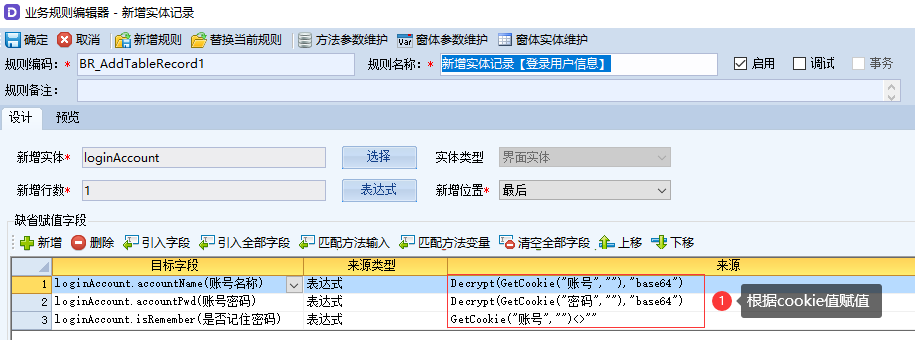
V-AppBase,提供的替换PC端登录页面和登录跳转页面的功能,以满足部分定制化需求。
1. 功能介绍
一般来说,在地址栏中输入服务对应的域名或服务所在IP+端口后,会跳转到默认的登录页面。
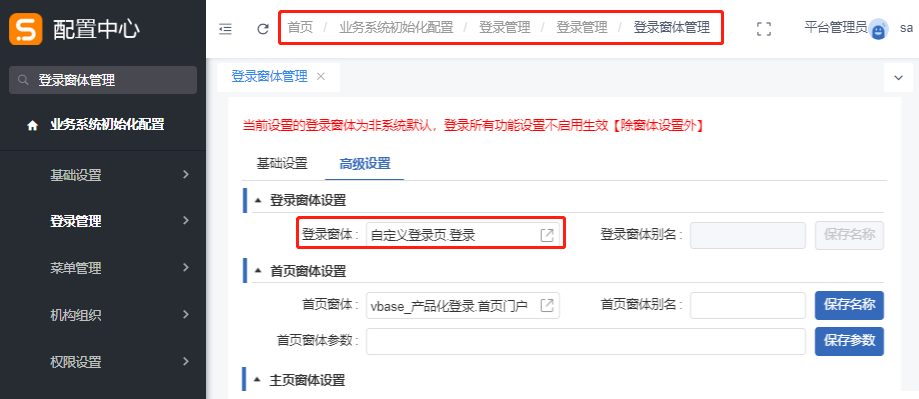
访问目录:配置中心 → 业务系统初始化配置 → 登录管理 → 登录管理 → 登录窗体管理
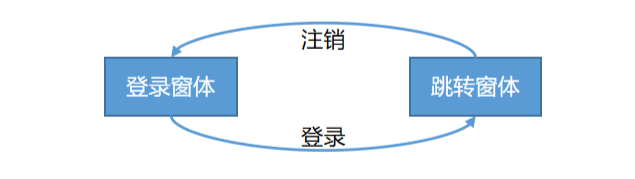
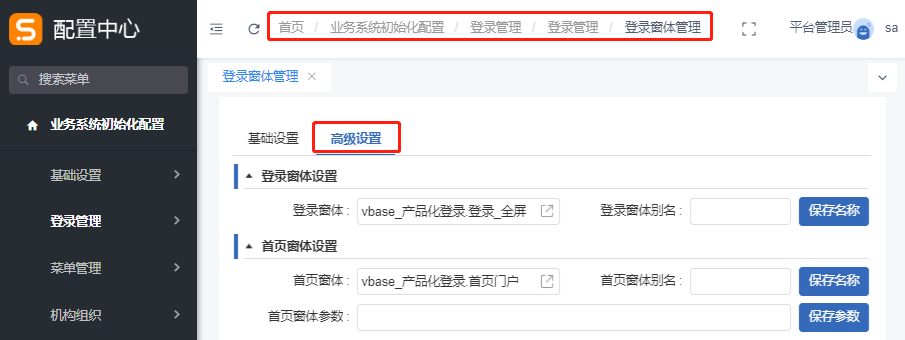
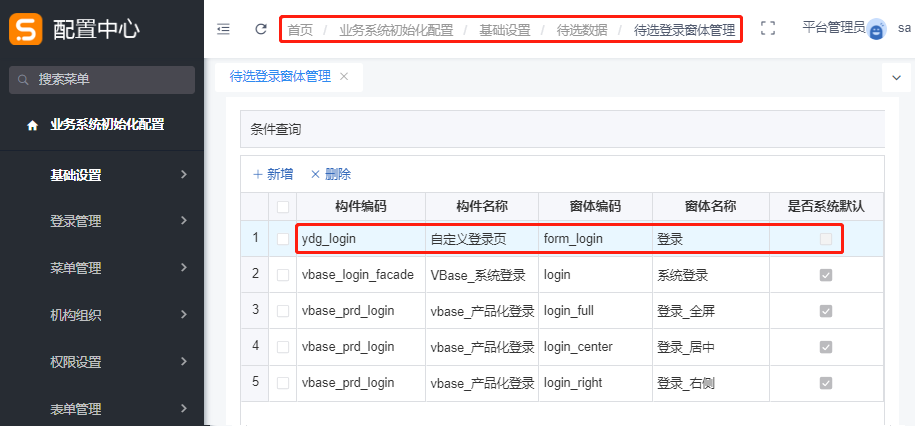
下面以自定义窗体为例,设置自定义登录页面。
2. 开发平台的配置

| 添加引用 | 作用 |
|---|---|
LoginComp(登录构件) | 用于校验登录身份认证、登入服务、查询登录用户信息、选择登录身份等。 |
vbase_organization(VBase_组织机构API) | 主要用于查询用户相关信息,判断登录用户是否管理员或超级管理员。 |
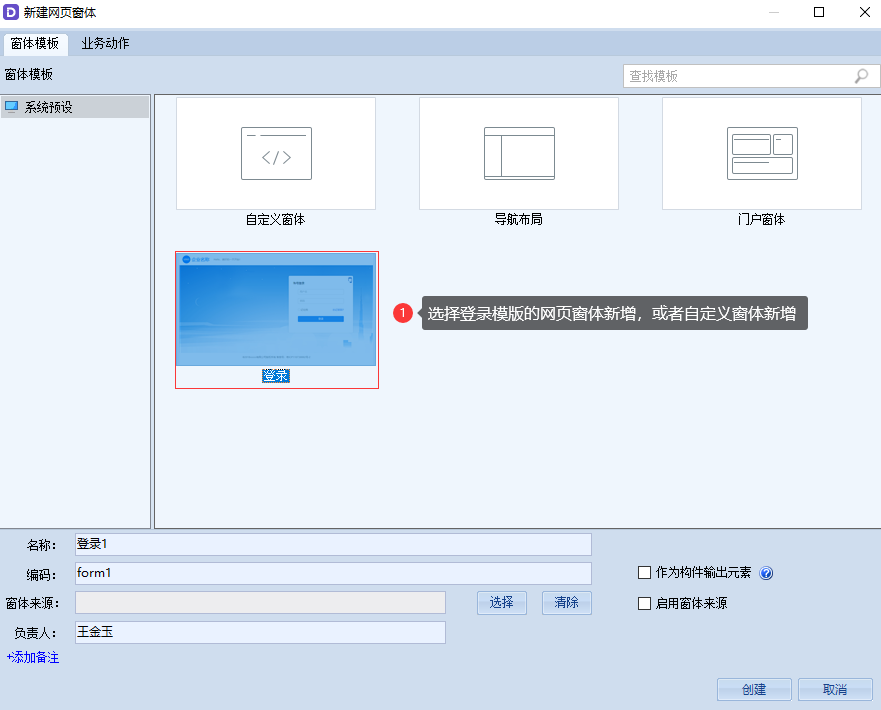
在本案例中,选择登录模版创建网页窗体。
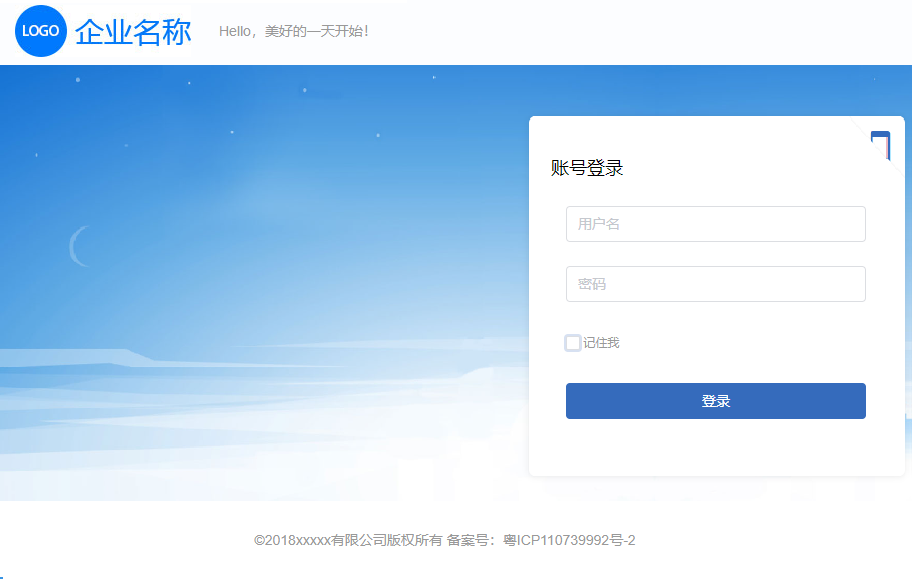
创建之后,可以查看该窗体相关样式,也可以按需修改。
- 界面样式
- template
- script
- theme.less
- var.less
<div class="page">
<header class="page-header">
<div class="main-header">
<section class="header-title">
<img src="../../../share/Login_logo.jpg">
<span>Hello,美好的一天开始!</span>
</section>
<section class="header-extra">
<!--此处显示右侧扩展信息,添加内容部署可查看效果-->
</section>
</div>
</header>
<div class="page-main">
<div class="main-warpper">
<!--登录信息面板start{-->
<div class="login-panel">
<div class="login-panel-swiper" :style="{left:`${sideLeft}px`}">
<section class="static-form">
<h5 class="login-panel-title">账号登录</h5>
<vui-form @keyup.enter.native="$emit('logining')">
<!-- 用户名文本 -->
<vui-form-item>
<vui-input v-model="loginAccount.current.accountName" autofocus size="large" placeholder=" 用户名 "></vui-input>
</vui-form-item>
<!-- 密码文本 -->
<vui-form-item>
<vui-input v-model="loginAccount.current.accountPwd" size="large" placeholder=" 密码 " type="password"></vui-input>
</vui-form-item>
<vui-form-item>
<CheckboxGroup>
<Checkbox label="记住我" v-model="loginAccount.current.isRemember"></Checkbox>
</CheckboxGroup>
</vui-form-item>
<vui-form-item>
<vui-button type="primary" size="large" long @click="$emit('logining')">登录</vui-button>
</vui-form-item>
</vui-form>
<em class="login-panel-handler" @click="toggle">
<vui-icon type="android-phone-portrait" title="手机扫码登录"></vui-icon>
</em>
</section>
<section class="quick-form">
<h5 class="login-panel-title">扫码登录</h5>
<div class="qrcode-img">
<img src="../../../share/qrcode.png">
</div>
<p>打开微信扫一扫</p>
<em class="login-panel-handler" @click="toggle">
<vui-icon type="android-desktop" title="账号登录"></vui-icon>
</em>
</section>
</div>
</div>
<!--}end-->
</div>
</div>
<!--footer-->
<footer class="page-footer">
<div class="footer-main">
©2018xxxxx有限公司版权所有 备案号:粤ICP110739992号-2
</div>
</footer>
</div>import vdk from 'v3-vdk';
import entities from './entities.js';
export default {
props: entities,
data: function () {
return {
sideLeft:0,
Fold:false,
};
},
methods: {
toggle(){
if (!this.Fold) {
this.Fold = true;
$(".static-form").hide();
$(".quick-form").show();
} else {
this.Fold = false;
$(".static-form").show();
$(".quick-form").hide();
}
}
}
};@import "../theme.less";
@import "./var.less";
//页面框架
.page{
position:relative;
min-width:@c-page-main-width;
min-height:600px;
width:100%;
height:100%;
font-size:@c-font-size-base;
color:@c-font-base-color;
//page-header
&-header{
position: absolute;
top: 0;
left:0;
z-index:1;
width:100%;
height: @c-page-header-height;
padding:0 @c-page-header-padding-h;
color:@c-page-header-color;
background:@c-page-header-bg;
.main-header{
width:@c-page-header-width;
height:@c-page-header-height;
margin:0 auto;
.header-title{
float:left;
width:@c-page-header-title-width;
height: @c-page-header-height;
line-height:@c-page-header-height;
text-align:left;
}
.header-extra{
margin-left:@c-page-header-title-width;
height:@c-page-header-height;
line-height:@c-page-header-height;
text-align:right;
}
> section > *{
display:inline-block;
vertical-align:middle;
line-height:1;
}
}
img{
height:52px;
vertical-align: middle;
cursor: pointer;
}
span{
margin-left: 24px;
line-height: @c-page-header-height;
}
}
//page-main
&-main{
position: absolute;
top:@c-page-header-height;
right:0;
left:0;
bottom:@c-page-footer-height;
.fullheight(@c-page-footer-display);
overflow:auto;
.main-warpper{
height:100%;
width: 100%;
position: relative;
background:@c-body-bg;
background-size:cover;
}
}
//page-footer
&-footer{
position:absolute;
bottom:0;
left:0;
width:100%;
height:@c-page-footer-height;
padding:@c-page-footer-padding;
background:@c-page-footer-bg;
text-align:center;
.showfooter(@c-page-footer-display);
.footer-main{
color:@c-page-footer-color;
width:@c-page-footer-width;
margin:0 auto;
}
}
}
//登录面板
.login-panel{
position: absolute;
top:12%;
left:50%;
margin-left:@c-page-main-width/2 - @c-login-panel-width;
width: @c-login-panel-width;
height:@c-login-panel-height;
border-radius:@c-login-panel-radius;
box-shadow:@c-login-panel-shadow;
background:@c-login-panel-bg;
overflow: hidden;
&-handler{
position: absolute;
top:0;
right:0;
display:@c-login-panel-handler-display;
width:@c-login-panel-handler-size;
height:@c-login-panel-handler-size;
line-height:1;
text-align:right;
box-sizing:border-box;
padding:8px;
font-size:@c-login-panel-handler-size/1.6;
color:@primary-color;
cursor:pointer;
}
&-handler:after{
content:'';
position:absolute;
left:0;
bottom:0;
width:@c-login-panel-handler-size;
height:@c-login-panel-handler-size;
background:url(../../../share/login-handler-mask.png);
background-size:100% 100%;
}
&-title{
margin:36px 0 24px -30px;
font-size: @c-font-size-large;
font-weight:400;
color:#000;
}
a{
float: right;
font-size:@c-font-size-small;
}
.static-form{
position: relative;
float: left;
width:@c-login-panel-width;
height: @c-login-panel-height;
padding:0 60px;
}
.quick-form{
.static-form;
.qrcode-img{
width:@c-login-qrcode-size;
height:@c-login-qrcode-size;
background:#f5f5f5;
box-sizing:content-box;
border:1px solid @border-split-color;
margin:44px auto 0;
}
p{
padding-top:32px;
text-align: center;
}
}
&-swiper{
position: absolute;
width: 420px;
height: @c-login-panel-height;
}
}
//show-footer
.showfooter(@c-page-footer-display) when(@c-page-footer-display = none){
display:none;
}
.fullheight(@c-page-footer-display) when(@c-page-footer-display = none){
bottom:0;
}//变量命名规范 @c-控件名-类型-状态-属性
//base
@c-font-size-large : 18px;
@c-font-size-base : 14px;
@c-font-size-small : 12px;
@c-font-title-color : #000;
@c-font-base-color : #999;
@c-body-bg : url("../../../share/Login_bg.jpg") #f1f1f1; //更换登录背景
//page
@c-page-main-width : 1000px; //页面主体信息宽度,不可设置auto
//header
@c-page-header-width : auto; //可选变量值auto和@c-page-main-width
@c-page-header-height : 76px;
@c-page-header-bg : #fcfdff;
@c-page-header-color : @c-font-base-color;
@c-page-header-padding-h : 20px; //一般不做修改
@c-page-header-title-width : 500px; //网站标题所占宽度,可不做修改,右侧扩展区需显示更多时再修改
//footer
@c-page-footer-display : block; //为none时隐藏页面的底部版权信息
@c-page-footer-width : auto; //可选变量值为auto和@c-page-main-width
@c-page-footer-height : 90px;
@c-page-footer-padding : 16px 0 0;
@c-page-footer-color : @c-font-base-color;
@c-page-footer-bg : #fff;
//login
@c-login-panel-width : 420px;
@c-login-panel-height : 372px;
@c-login-panel-radius : 6px;
@c-login-panel-bg : #fff; //建议当@c-login-panel-handler-display:none;时修改
@c-login-panel-shadow : 0 0 7px 0 rgba(0,0,0,.1);
@c-login-panel-handler-display : block; //为none时隐藏右上角的切换图标
@c-login-panel-handler-size : 64px;
@c-login-qrcode-size : 154px;

- 1.窗体加载事件
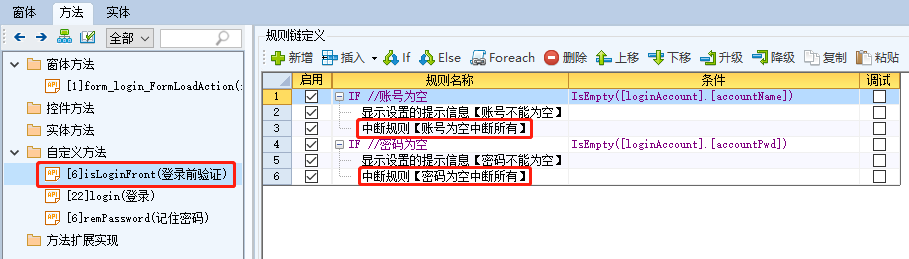
- 2.isLoginFront(登录前验证)
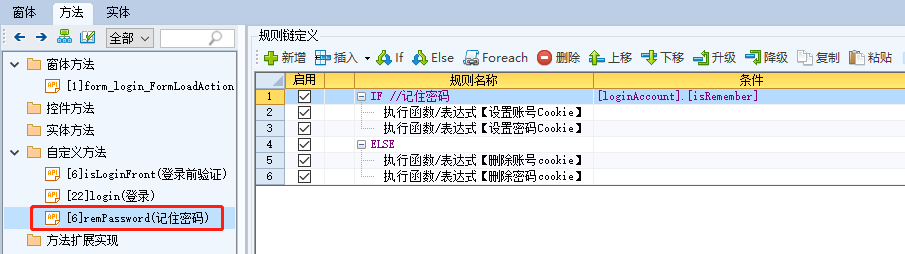
- 3.remPassword(记住密码)
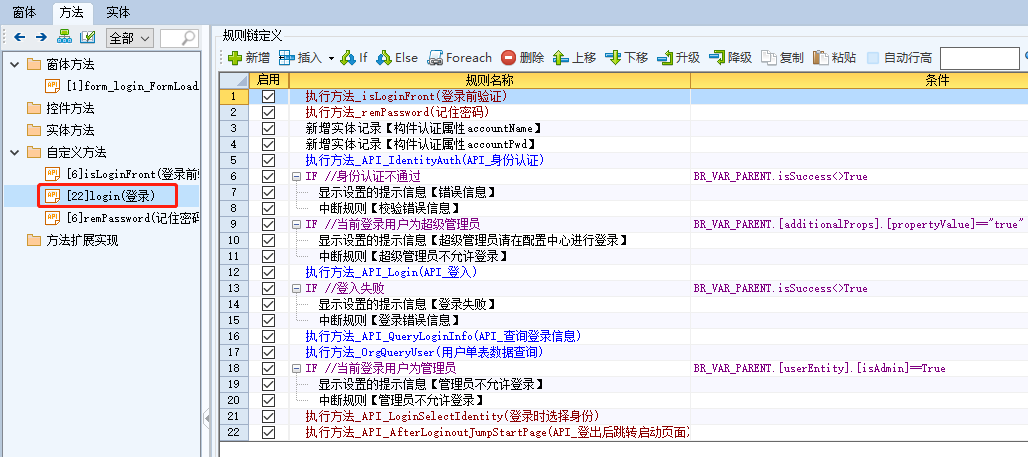
- 4.login(登录)
主要是判断登录的账号和密码是否为空,为空则提示相关信息,并且中断所有规则链。
① 当勾选记住密码后,将相关的账号和密码信息设置
cookie。设置 cookie 后,在窗体加载事件中,新增实体记录时可以从
cookie中获取。提示:如果账号/密码设置cookie时设置加密,那么获取时则需要解密
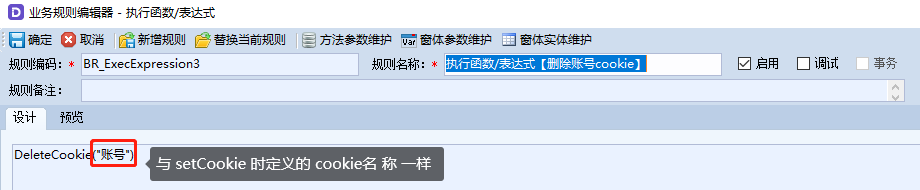
② 当取消勾选记住密码后,将相关的
cookie信息删除。
(1)方法变量
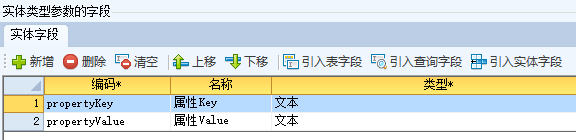
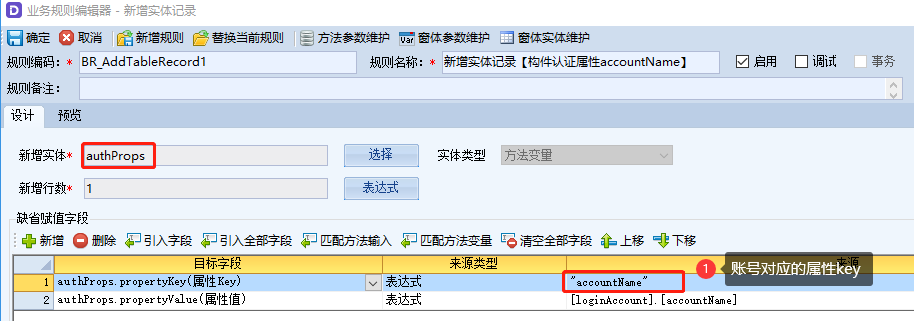
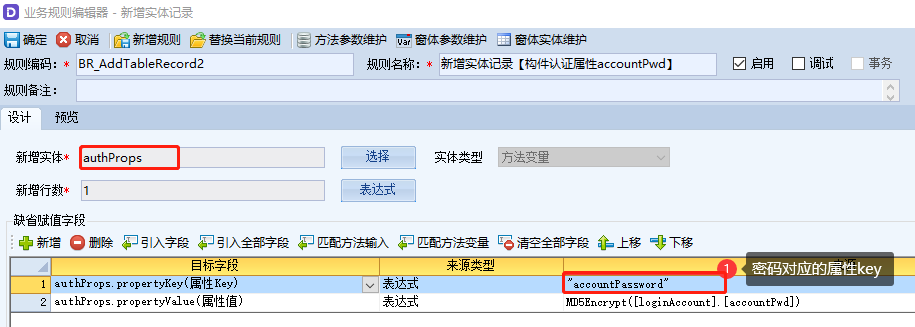
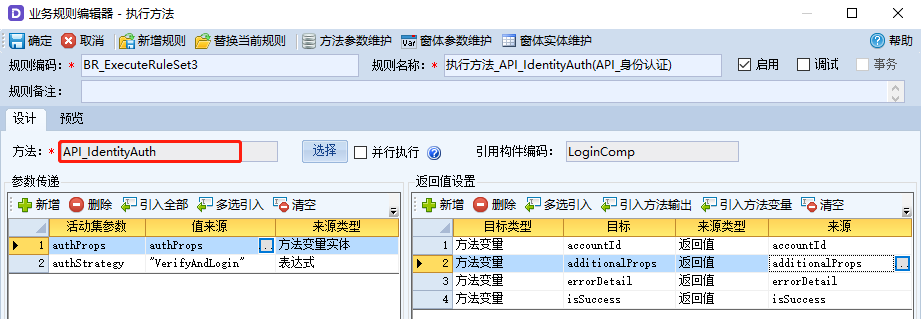
编码 名称 类型 初始值 描述 authProps认证属性 实体 根据账号和密码信息,新增对应的认证属性实体记录
实体字段:additionalProps输出扩展属性 实体 主要用于身份认证时,判断该账号是否超级管理员账号
返回值为Key= isSa,Value = true / false
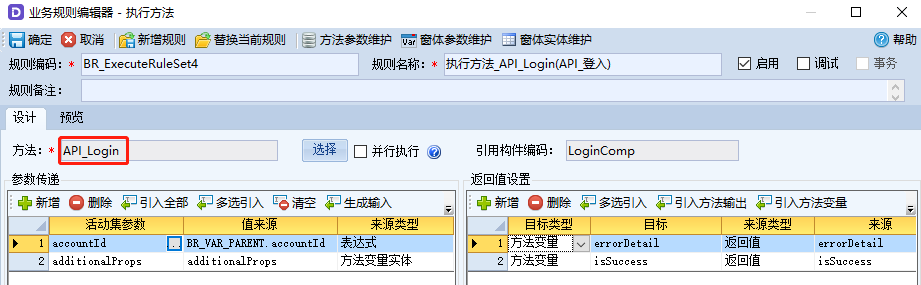
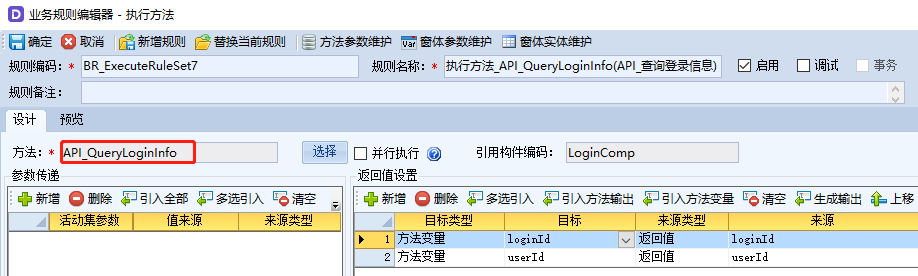
实体字段:isSuccess是否成功 布尔 False用于接收执行 API 时的返回值 “是否成功” errorDetail错误信息 文本 用于接收执行 API 时的返回值 “错误信息” accountId登录账号ID 文本 根据身份认证,返回当前用户的账号 ID 信息 userId用户ID 文本 当前登录账号所属人员 id (可能为空) loginId登录ID 文本 当前登录账号id(默认同 accountId) userEntity用户数据 实体 用户查询当前登录用户信息,判断是否管理员用户
实体字段:(2)规则配置
① 执行方法_isLoginFront(登录前验证)
② 执行方法_remPassword(记住密码)
③ 新增实体记录【构件认证属性accountName】
④ 新增实体记录【构件认证属性accountPwd】
⑤ 执行方法API_IdentityAuth(API身份认证)
⑥ IF:
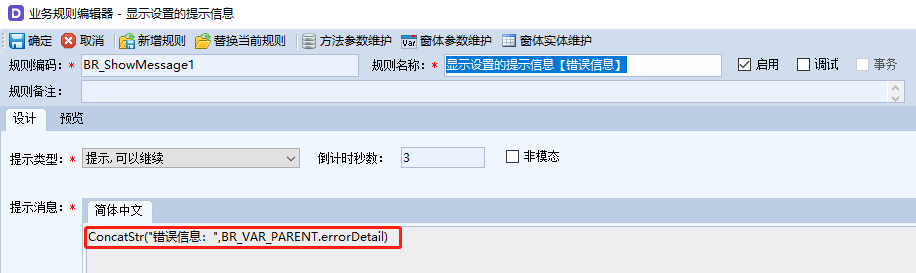
BR_VAR_PARENT.isSuccess <> True——如果身份认证不通过 a、显示设置的提示信息【错误信息】
b、中断规则【校验错误信息】——退出当前规则链
⑦ IF:
BR_VAR_PARENT.[additionalProps].[propertyValue]== "true"——是否超级管理员 a、显示设置的提示信息【超级管理员请在配置中心进行登录】
b、中断规则【超级管理员不允许登录】——退出当前规则链
⑧ 执行方法API_Login(API登入)
⑨ IF:
BR_VAR_PARENT.isSuccess<>True——如果登入失败 a、显示设置的提示信息【登录失败】
b、中断规则【登录错误信息】——退出当前规则链
⑩ 执行方法API_QueryLoginInfo(API查询登录信息)
⑪ 执行方法_OrgQueryUser(用户单表数据查询)
⑫ IF:
BR_VAR_PARENT.[userEntity].[isAdmin]==True——判断返回的用户是否管理员 a、显示设置的提示信息【管理员请在配置中心进行登录】
b、中断规则【管理员不允许登录】——退出当前规则链
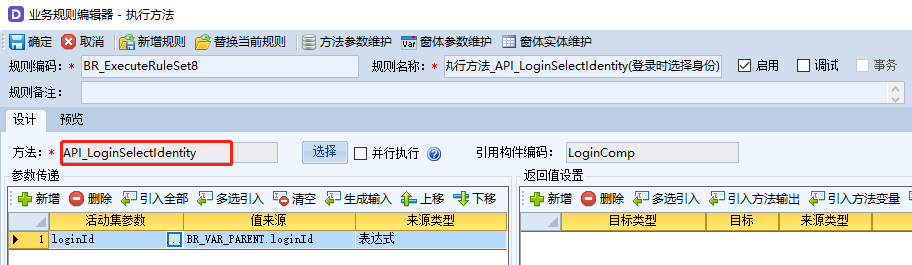
⑬ 执行方法_API_LoginSelectIdentity(登录时选择身份)
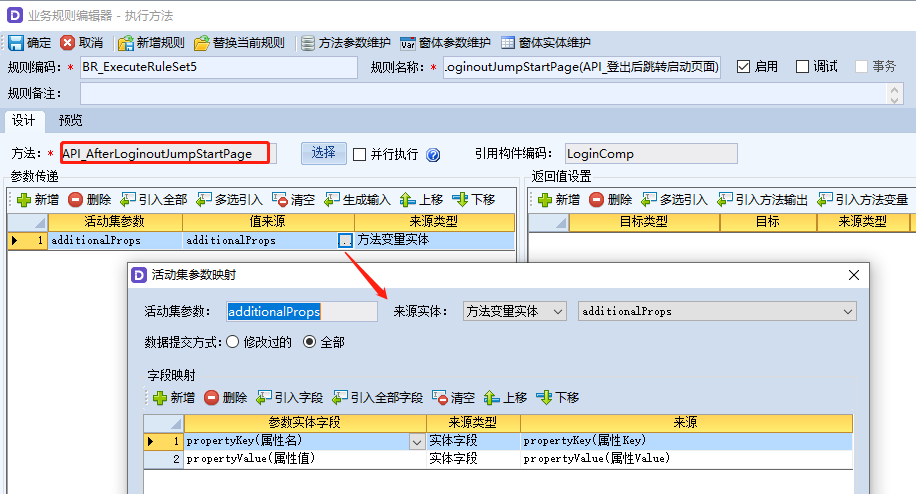
⑭ 执行方法API_AfterLoginoutJumpStartPage(API登出后跳转启动页面)